



Dear recruiters, Atlassian has updated its badges, making it easier to quickly evaluate and interpret our credentials. In the past, you could check a catalog to verify a candidate’s Atlassian skills, but that’s no longer the case. Here’s what the new badge system shows you, and what it still doesn’t.
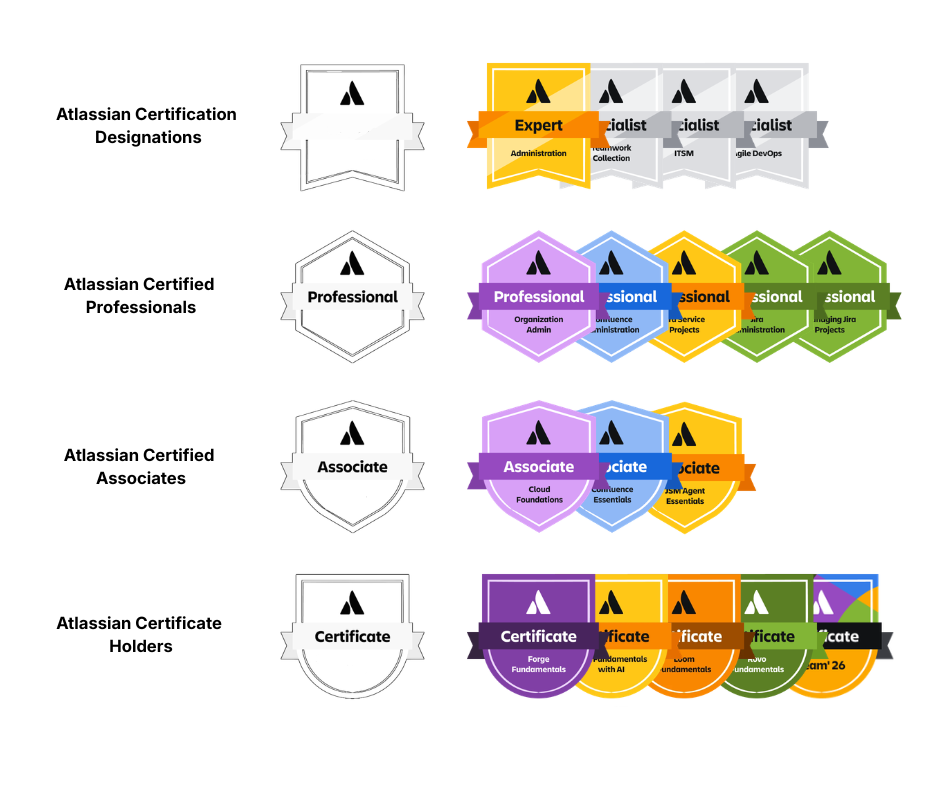
The shape of each badge shows the level.
There are four tiers, each showing its own shape: a rounded shield means Certificate, a pointed shield means Associate, a hexagon means Professional, and a banner means Designation. This lets you sort badges by seniority at a glance. Colors don’t show level; they just group related product families and use Atlassian’s standard colors, so gold isn’t higher than green. The only exception is Designations: silver means Specialist and gold means Expert, where color does show rank.
Certificate Holders are in the ACH tier and have a rounded shield badge. This shows they have basic knowledge of one app or solution. The exam is short and free, and most people prepare in an afternoon or over a few evenings. This badge shows current interest and a starting point, but it doesn’t prove the person has used the product in real work. For junior candidates, it’s a good sign; for senior ones, it’s just background.
Associates are in the ACA tier and have a pointed shield badge. This level recognizes people who use Atlassian tools regularly in their jobs. Preparing takes anywhere from a few days to a few weeks, and it’s hard to pass without real hands-on experience. This badge shows the candidate is productive with the tool, but it doesn’t mean they can set it up or scale it for others.
Professionals are in the ACP tier and have a hexagon badge. This level shows someone can administer, design, manage, and scale Atlassian solutions. You can’t just cram for this exam; it rewards real experience over studying. Preparation usually takes weeks or months, plus time spent actually running an environment. This badge means the person builds and supports the platform. If you need an administrator, architect, or consultant, look for this shape.
Atlassian Designations use a banner shape and come in silver or gold. You don’t earn a Designation with just one exam. Instead, you have to combine several related credentials, so it can’t be earned quickly or by chance. Silver means Specialist, and gold means Expert. This badge shows a long-term commitment in a field and is the strongest sign of broad skills on a profile.
Preparation time is the real investment, and candidates are the ones who put it in. What is crucial is how long it takes to prepare: an afternoon for a certificate, weeks for an associate, months plus real experience for a professional, and a long stretch across several exams for a designation. When you see a badge shape, you’re seeing how much effort the person put in.
Always check the date, because badges expire. Many CV screenings miss this step. Certificates last for twelve months, after which the holder retakes the free exam. Certifications like ACA and ACP are valid for twenty-four months plus a ninety-day grace period. To renew, candidates need continuing education units: fifty for an associate and one hundred for a professional. These units count for all certifications a person holds and come from regular professional activities: an Atlassian Learning course is worth ten units, a local community event is ten, and a big global event like Team is thirty. Renewal takes time and engagement, not money. If you see a lapsed badge, the person has not forgotten their skills.
Don’t just trust the badge image; verify it. Every credential has a link to a verifiable transcript. A badge on a CV or LinkedIn is just a picture, and pictures can be changed. Asking for the transcript link only takes a few seconds and confirms everything. Atlassian also doesn’t allow holders to crop, recolor, or change badge artwork, so if a badge looks odd, it probably is.
During the rollout, you’ll see mixed profiles. Some people will have old round blue seals next to new shaped badges. If you don’t see a new badge shape, it doesn’t mean the credential isn’t current – check the date and the transcript, not just the badge artwork.
Here’s what the framework still doesn’t show you: the badge shape tells you the tier, and the text tells you the topic, but neither shows the scale. For example, an ACP badge looks the same whether someone managed a fifty-user setup or a fifteen-thousand-user one. The badge is a starting point, not the limit, so keep asking about environment size, migration experience, and real problems faced.