


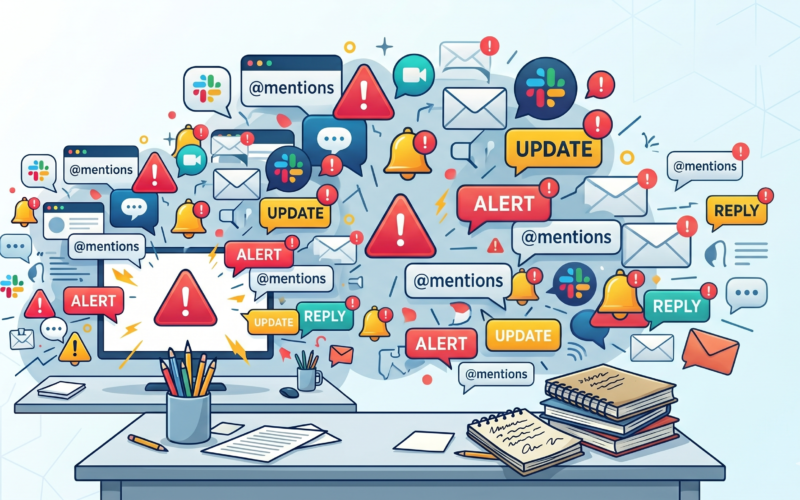
Modern teamwork suffers from a silent productivity killer: noise. We have all been there → flooded by Jira updates, buried in Slack threads, and drowning in email notifications. Building a true System of Work means learning how to DJ your workspace: turning down the generic ‘good to know’ background bass so the critical ‘it’s your turn’ vocals can cut clearly through the mix.
At Atlassian Team ’26, I hosted a collaborative discussion on this challenge to address notification fatigue, turn the Atlassian platform into a true “System of Work,” and keep our data clean and ready for AI.
Before exploring our findings, it’s important to point out the unique environment that enabled this conversation.
The Backdrop: What is a Braindate?
Created by the company e180, Braindates are intentional, peer-to-peer learning experiences designed to help event attendees connect, share knowledge, and learn from one another. Instead of just passively listening to a keynote, participants post topics they are passionate about and gather in small groups (or one-on-one) for meaningful, targeted conversations.
At Team ’26, the entire Braindate experience was flawlessly orchestrated by David Tran (Experience Producer at Braindate), Makkaida Vischon, and their incredible onsite team. They created the perfect hub for practitioners to cut through the marketing buzz and talk about real-world implementation.
As Head of Atlassian Practice at XALT Business Consulting GmbH (and an Atlassian Champion/SME), I wanted to tackle a problem every organization faces: How do we differentiate between “good to know” and “it is my turn to act”? When everything demands attention, nothing gets prioritized.
Here is the report of what our Braindate group discovered, followed by an expansion of what else is possible.
The Group’s Blueprint (Solutions from Our Braindate)
Our group brought together different backgrounds, but we all agreed on one thing: User adoption of Jira depends entirely on retaining a reliable notification and information system. If the tool burns up your time and slows your processes, users will abandon it.
To combat this, our circle highlighted six actionable configuration tactics:
- Utilizing the Jira Notification App and shifting the focus away from the inbox, and encouraging users to leverage the native notification bell within Jira to manage their immediate tasks.
- Turning Off Email Notifications (Mostly) and replacing the nonstop stream of real-time emails with customized dashboards and daily filters. If it isn’t urgent, it belongs on a dashboard, not in an inbox.
- Customizing the Default Notification Schemas by moving away from generic “All Watchers/All Project Members” schemas. A great recommendation was to use custom User Picker or Group Picker fields based on active roles directly in the issue and notification schema.
- Using advanced Workflow Post-Functions within Jira workflows to trigger highly specific, context-aware automated emails only when critical milestones are hit.
- Utilizing Atlassian’s AI agent, Rovo, to automatically compile and generate clean daily or weekly reports for specific stakeholder groups, saving manual summary time.
- Setting up automation rules to silently strip out watchers as an issue progresses, or automatically clearing the list post-resolution to prevent zombie notifications on closed tickets.
The Bigger Picture
During our chat, it became clear every configuration is unique because of the people behind it. There is no silver bullet. Your approach will vary depending on whether your team is completely remote, hybrid, or co-located, and where you are on your journey to build “system trust.”
If you want to expand beyond our group’s core list, here are alternative architectural solutions to transition into a true System of Work:
1. The Tech-Stack Pivot: Shifting Noise from Mail to Chat
For organizations heavily reliant on tools such as Slack or MS Teams, the solution is not to fix email but to abandon it.
- Chat-Ops Routing: Instead of alerting individuals, route Jira events to dedicated, public project channels using the official Slack/Teams integrations.
- The Psychological Shift: This moves notifications from a private burden, an individual’s inbox, to a shared space. Teams can use emoji reactions (e.g., 👀 for “I’m looking at this”, ✅ for “Done”) to collaborate transparently without generating new notifications.
2. Tailoring by Team Topology & Maturity
Where your company sits on its “trust journey” influences your configuration:
- In the beginning, after a transition, teams often require rigid, automated guardrails like mandatory fields and more notification “just in case”, so that all have identical information and work isn’t stuck or forgotten.
- Later, while trust in the tools is high, teams further along their journey can rely on async summary dashboards. They don’t need real-time pings because they trust their peers to check their queues and dashboards naturally throughout the day.
3. The “Push” vs. “Pull” Information Architecture
To successfully fight fatigue, system administrators must explicitly design the environment around two distinct data streams:
| Information Type | Definition | Best Technical Delivery |
| “Is it my turn to act?” (Push) | Direct action is required by a specific user right now to move a process forward. | Targeted Jira App notifications, direct mentions in chat, or automated Slack pings via workflow transitions. |
| “Good to know” (Pull) | Contextual information that is valuable for transparency but requires no immediate action. | Saved JIRA filters, customized Confluence spaces, Atlassian Rovo weekly digests, or wallboard Dashboards. |
Conclusion: Clean Data, AI Readiness, and Trust
Ultimately, cleaning up your notification ecosystem isn’t just about peace of mind; it’s a prerequisite for the future of work. If your Jira issues are cluttered with automated bot comments, duplicate updates, and chaotic history logs, any LLM or AI assistant like Atlassian Rovo you deploy will struggle to find the truth.
By refining your notification schemas, choosing the right chat integrations, and separating “Push” from “Pull” data, you build an environment of trust. Users stop ignoring the system, the data stays pristine, and Jira finally becomes the reliable backbone of your enterprise.
I am looking forward to the vital conversations at Team ’26 Europe in Amsterdam!